
Mission keys

Collapse
X
 
  • Time
  • Show
Clear All
new posts
  • Airi Dawn
    • Nov 2025
    • 8

    #1

    Mission keys

    How do mission keys work? I've tried searching about them and can't find any helpful information about them. Thank you in advance
  • Penny Team-SV
    SmallVerse Moderator
    • Jun 2025
    • 275

    #2
    Airi, I am not sure what you are referring to. Are you referring to the key item and how it is linked to task completion? Please explain in more detail so that we're able to help you.

    Comment

    • Airi Dawn
      • Nov 2025
      • 8

      #3
      Yes, is there any significance to using them for specific missions, like getting an npc to speak only during that part of the task?

      Comment

      • Penny Team-SV
        SmallVerse Moderator
        • Jun 2025
        • 275

        #4
        No, the Old Key item is often used in missions much like scrolls. These are optional and are not fundamental to a mission/interactions. You can set-up a NPC to speak by using interactions; i.e when a button, avatar says, proximity, event is triggered and you then set the NPC to "say something". If you need more assistance with interactions, I'd be happy to provide visual instructions. The best way to become familiar is to play around with them for yourself.

        Comment

        • Aribella Lafonte
          • Dec 2024
          • 35

          #5
          I believe she is talking about adding extra conditions like artifacts and mission codes that prevent an interaction from triggering unless it meets certain requirements. An artifact is the best way to go with that since I don't believe mission codes are working perfectly as of yet since we are still in beta.

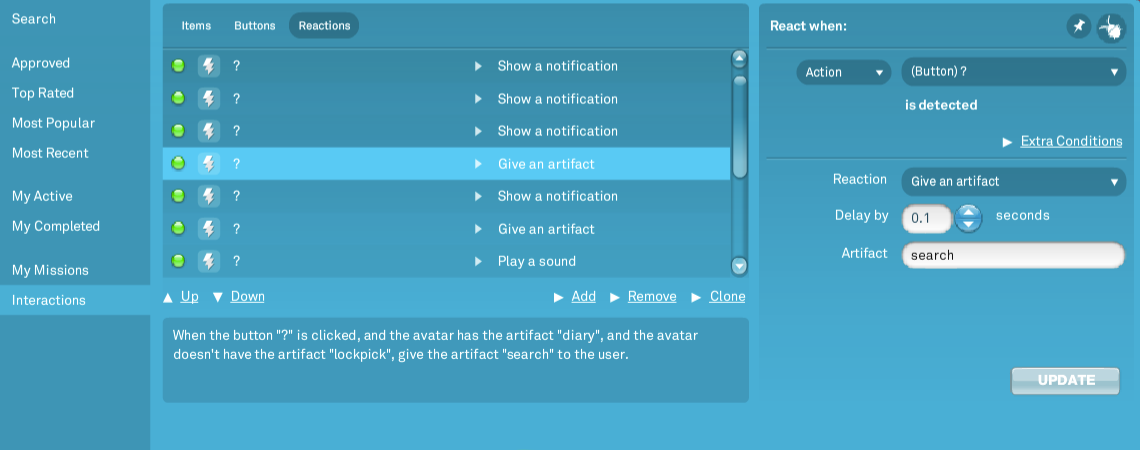
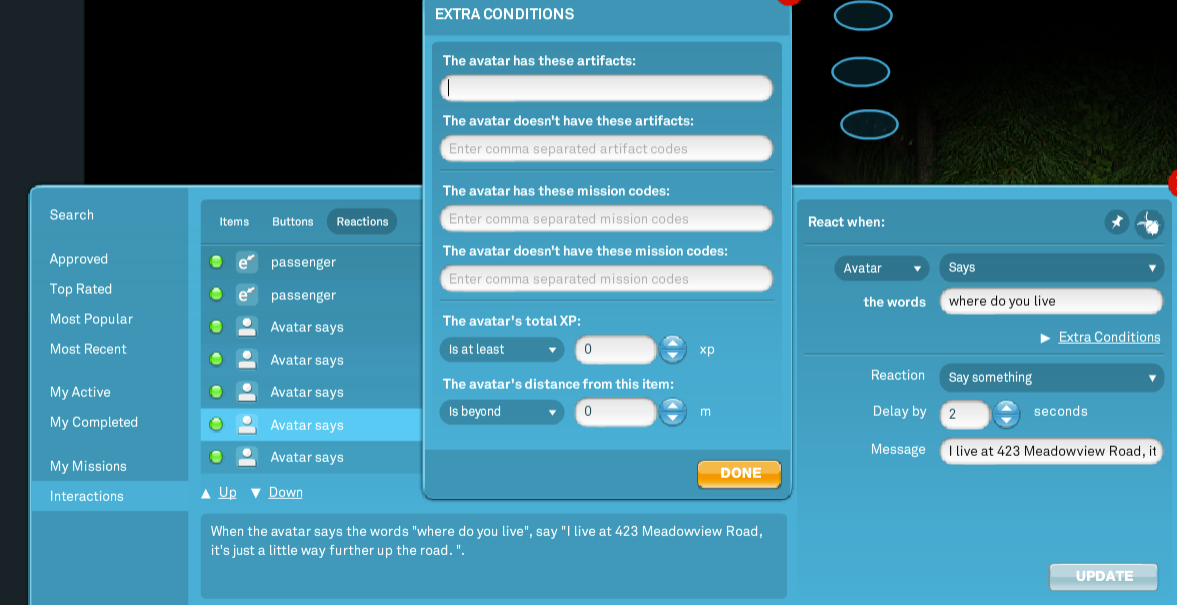
          On a previous task before you have the NPC speak, go into interactions and have interacting with an item, emote, gesture, however you would like to set it up as give an artifact as its reaction. Then go into the interaction with the say line and on the right side of that panel will say extra conditions, with that, another panel opens up; from there at the top is where you enter the extra conditions as to whether the player has or does not have the artifact.

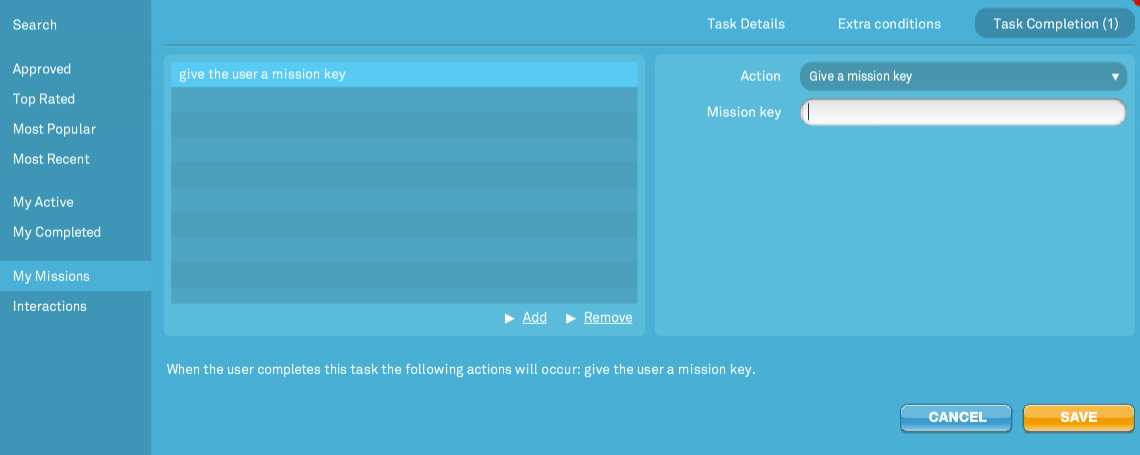
          It will also be where you enter that the player has the specific mission codes as well, if you opt to use them instead; those are given within the CMP (the panel where you create your mission) and not on the item itself, see 2nd image below.

          Giving the artifact:


          Extra Condition Panel to enter the artifacts/mission codes:


          To give mission codes (within the CMP under task completion tab)
          Comment

          • Airi Dawn
            • Nov 2025
            • 8

            #6
            Originally posted by Aribella Lafonte
            I believe she is talking about adding extra conditions like artifacts and mission codes that prevent an interaction from triggering unless it meets certain requirements. An artifact is the best way to go with that since I don't believe mission codes are working perfectly as of yet since we are still in beta.

            On a previous task before you have the NPC speak, go into interactions and have interacting with an item, emote, gesture, however you would like to set it up as give an artifact as its reaction. Then go into the interaction with the say line and on the right side of that panel will say extra conditions, with that, another panel opens up; from there at the top is where you enter the extra conditions as to whether the player has or does not have the artifact.

            It will also be where you enter that the player has the specific mission codes as well, if you opt to use them instead; those are given within the CMP (the panel where you create your mission) and not on the item itself, see 2nd image below.

            Giving the artifact:


            Extra Condition Panel to enter the artifacts/mission codes:


            To give mission codes (within the CMP under task completion tab)

            Thank you Aribella this was very helpful

            Comment

            • Mya SmallVerse
              SmallVerse Staff
              • Oct 2024
              • 268

              #7
              Originally posted by Airi Dawn

              Thank you Aribella this was very helpful
              Just following up on this. I recommend using artifacts for the time being, as there have been some bugs with mission keys not assigning or removing correctly. Others here may be able to share more insight if they’ve run into this specific issue themselves. I’ll make sure this is added to our current Known Bugs list so the development team can review it further.

              Using artifacts in your mission is a great way to ensure players have exactly what they need to progress. You can assign artifacts through items by button clicks, specific phrases, emotes, proximity triggers, and more. This works perfectly for things like requiring a player to pick up a “key item” (artifact) before opening a door or completing a task.

              If you have any questions or need help setting this up, feel free to ask! There are plenty of experienced players and staff here who can offer guidance. Artifacts and event codes can be a bit tricky at first, but once you get the hang of them, they’re super helpful!

              ~
              Mya SmallVerse
              Moderation Lead

              Comment

              • Airi Dawn
                • Nov 2025
                • 8

                #8
                Originally posted by Mya SmallVerse

                Just following up on this. I recommend using artifacts for the time being, as there have been some bugs with mission keys not assigning or removing correctly. Others here may be able to share more insight if they’ve run into this specific issue themselves. I’ll make sure this is added to our current Known Bugs list so the development team can review it further.

                Using artifacts in your mission is a great way to ensure players have exactly what they need to progress. You can assign artifacts through items by button clicks, specific phrases, emotes, proximity triggers, and more. This works perfectly for things like requiring a player to pick up a “key item” (artifact) before opening a door or completing a task.

                If you have any questions or need help setting this up, feel free to ask! There are plenty of experienced players and staff here who can offer guidance. Artifacts and event codes can be a bit tricky at first, but once you get the hang of them, they’re super powerful!

                ~
                Mya SmallVerse
                Moderation Lead
                Thank you Mya

                Comment

                • Mya SmallVerse
                  SmallVerse Staff
                  • Oct 2024
                  • 268

                  #9
                  Originally posted by Airi Dawn

                  Thank you Mya
                  Mission keys work very similarly to artifacts, but they’re generally easier to use when building missions. With mission keys, you can assign or remove them directly during task completion without needing extra items or triggers, which makes the process more streamlined. Mission keys are primarily intended for mission specific use, while artifacts can be used both inside and outside of missions.

                  We’ll be reviewing our Known Bugs list soon and working through those issues, so I’ll make sure mission keys are included. Once the related bugs are resolved, you should be able to start using them normally again. We will include this in our game update notes once this is fixed!

                  Hope this helps!

                  ~
                  Mya SmallVerse
                  Moderation Lead

                  Comment

                  Working...